Report a Fake Facebook Account or Impersonation (2026)
 Bruqi team
To report a fake Facebook account, open the profile, click the three dots below the cover photo and choose Report profile. If you have no Facebook account, use Facebook’s Report an Impostor Account form instead.
- Form URL: facebook.com/help/contact/
295309487309948 - Facebook’s help page: facebook.com/help/fakeaccount
Facebook does not allow profiles or Pages that pretend to be someone else. This guide covers the report with and without an account, fake Pages, scammers and catfish accounts that use your photos, and what to do when the account comes back.
Fake accounts that sell your photos tend to come back. Bruqi is one of the top leak removal services for online creators, with over 51 million leaks removed and a place in Google’s Trusted Copyright Removal Program.
Bruqi’s Creator Pro plan, at $99 a month, takes impersonator accounts down for you on top of daily leak removals. See how the takedown service works.
How to report a fake Facebook account, step by step
If you have a Facebook account, report the fake profile from inside Facebook. These steps follow Facebook’s help page Report a Facebook profile or Page pretending to be you or someone else.
Step 1. Find the fake profile
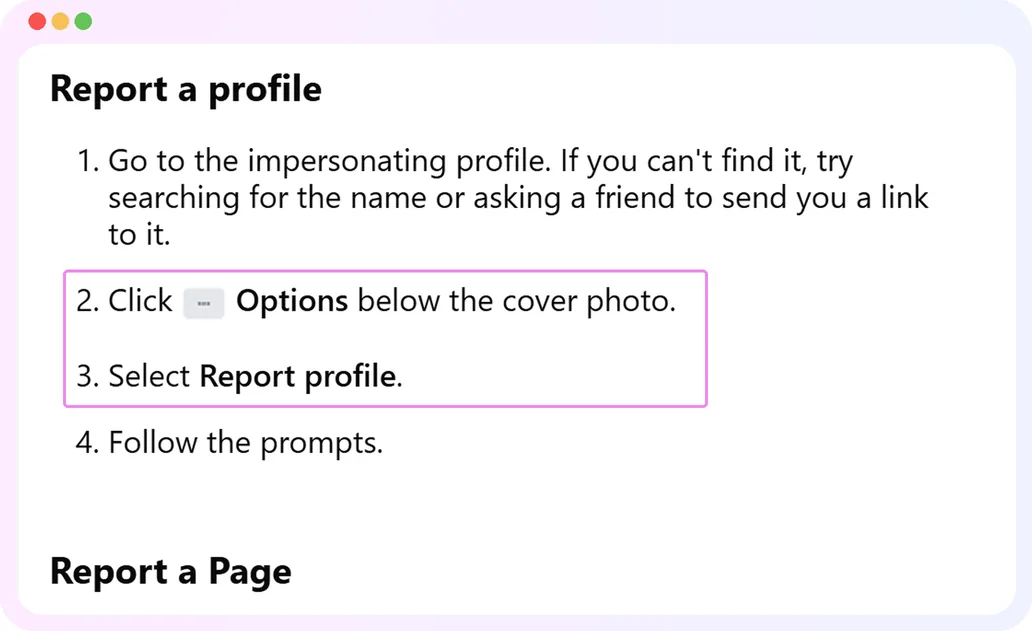
Go to the profile that is pretending to be you. If you cannot find it, Facebook suggests searching for the name or asking a friend to send you a link to it.
Copy the link and keep it in a note. You will need it again if the report has to be repeated, or if the account comes back.
Step 2. Open the menu below the cover photo
Click the three dots, called Options, below the cover photo. Then select Report profile. In some versions of Facebook the option reads “Find support or report profile”.
Step 3. Follow the prompts
Follow the prompts and choose the answers that describe the problem: a profile that is pretending to be you.
Facebook notes that, depending on your answers, you may then be able to submit a report to Meta. For some types of content it only uses your feedback to train its systems.
Step 4. Follow your report in the Support Inbox
Facebook sends a notification to your Support Inbox, where you can check the status of your report and see the decision.
How to report impersonation on Facebook without an account
You can report an impersonating profile or Page even if you do not have a Facebook account. The same form is for people who lost access to their account. It is Facebook’s Report an Impostor Account form.
Step 1. Open the Facebook impersonation report form
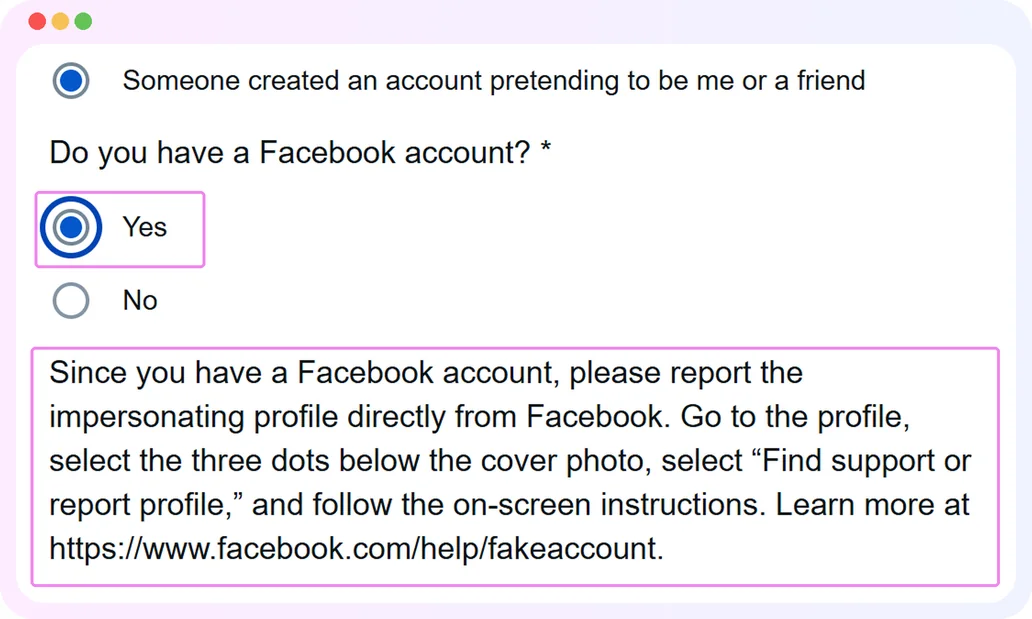
Choose “Someone created an account pretending to be me or a friend”. Then say whether you have a Facebook account.
Have a Facebook account? Then the form sends you back to Facebook. Report the fake from the profile’s own menu, as in the steps above.
Step 2. Say who you are
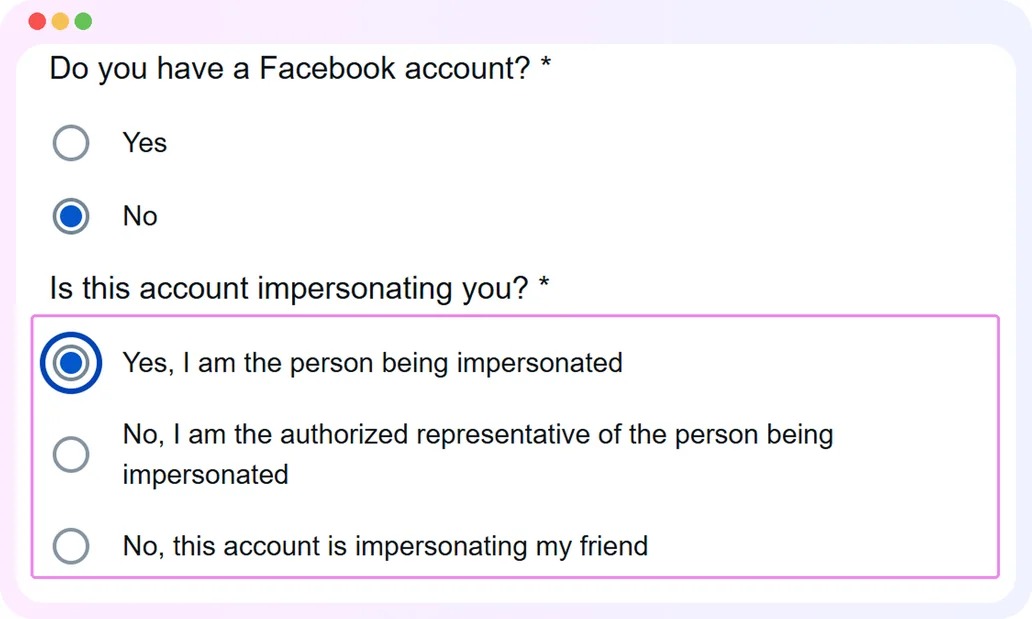
The form asks whether the account is impersonating you. There are three answers: you are the person being impersonated, you are their authorized representative, or the account impersonates your friend.
Step 3. Add the details Facebook asks for
The form then asks for:
- Your full name and a contact email address.
- The full name on the fake profile.
- The email address or phone number on the fake profile, if you can see one.
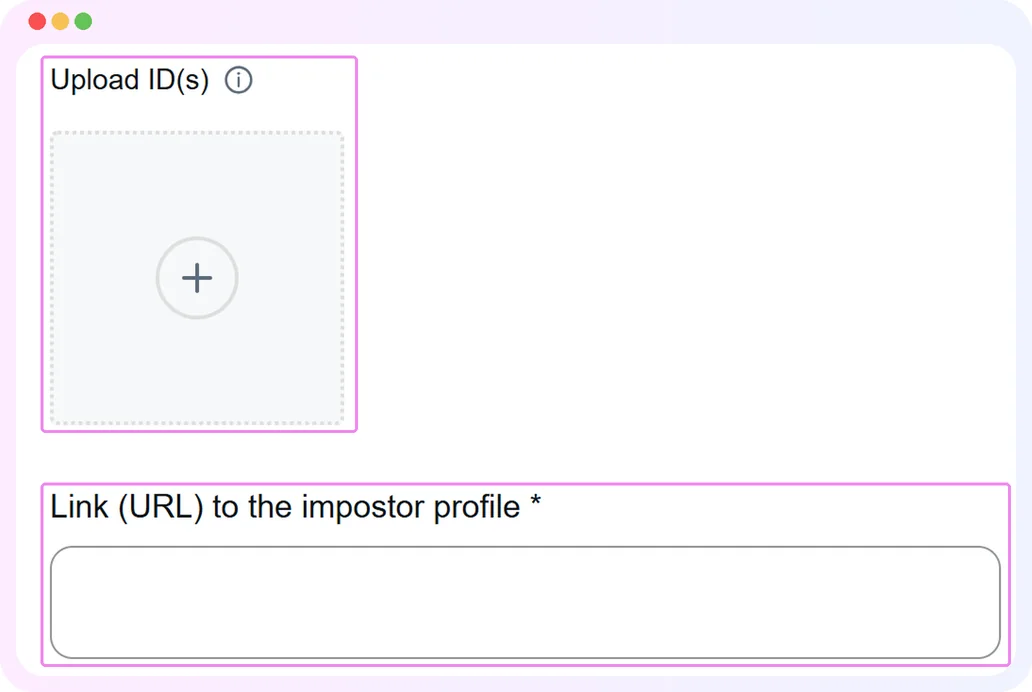
- Your ID, or the ID of the person you represent, in the upload field.
- The link to the fake profile.
- Additional information.
The ID field is not marked as required. In the additional information, say plainly that the profile uses your name and photos, and give the link to your real profile.
Fake Facebook profile or fake Page
A Page is reported the same way as a profile. Go to the Page, click Options below the Page’s cover photo and select Report Page.
Facebook’s Page help adds that if you cannot open the Page, you can ask a friend to report it. You can also report a profile or Page that pretends to be you from a conversation in Messenger, with the category “Pretending to be someone”.
Who can report a fake account on Facebook
Anyone can report from inside Facebook. Facebook asks people to tell it about profiles pretending to be them, someone they know or a public figure, so a friend can report a fake profile of you too.
The form without an account is stricter. If you choose “this account is impersonating my friend”, it answers that only the person being impersonated or their authorized representative can submit it.
How to remove a fake Facebook account
You cannot delete a fake Facebook account yourself, because it is not yours. You report it, and Facebook decides whether it breaks its rules.
Under Meta’s authentic identity policy, Facebook restricts or disables accounts and Pages that use another person’s images, name or likeness to deceive others.
Fan and parody accounts are allowed when the name makes clear the account is not official, for example with “fan page” in it. A fake that copies your name and photos without saying so is not a fan account.
How to report a scammer on Facebook
If you think a profile, Page, post or message is a scam, do not reply. Report it with the Report option next to it, which Facebook calls the best way to report abuse and spam.
Facebook’s guide to avoiding scams says scammers create fake accounts pretending to be someone they are not. One scam it lists is selling lifetime access to subscription services for a single payment and never delivering it.
Creators see the same trick with their own photos. An account offers your paid content cheaply, takes the money and disappears. Report it as pretending to be you, because impersonation alone breaks Facebook’s rules.
Catfish Facebook accounts that use your photos
A catfish account uses your photos under a different name. Facebook’s scam guide describes the romance scam behind many of them: romantic messages to strangers, then a request for money.
Meta’s policy counts using someone’s images or likeness to deceive others as impersonation, even when the name is different. Report the catfish account as pretending to be you, and add the link to your real profile so the reviewer can compare.
When it is copyright, not impersonation
If someone reposts photos or videos you made, but does not pretend to be you, that is a copyright matter. Follow our guide to the Facebook copyright report form instead.
If a photo shows you but someone else took it, Facebook has a separate privacy report for photos and videos. You can use more than one route for the same account.
A fake Page using your brand name
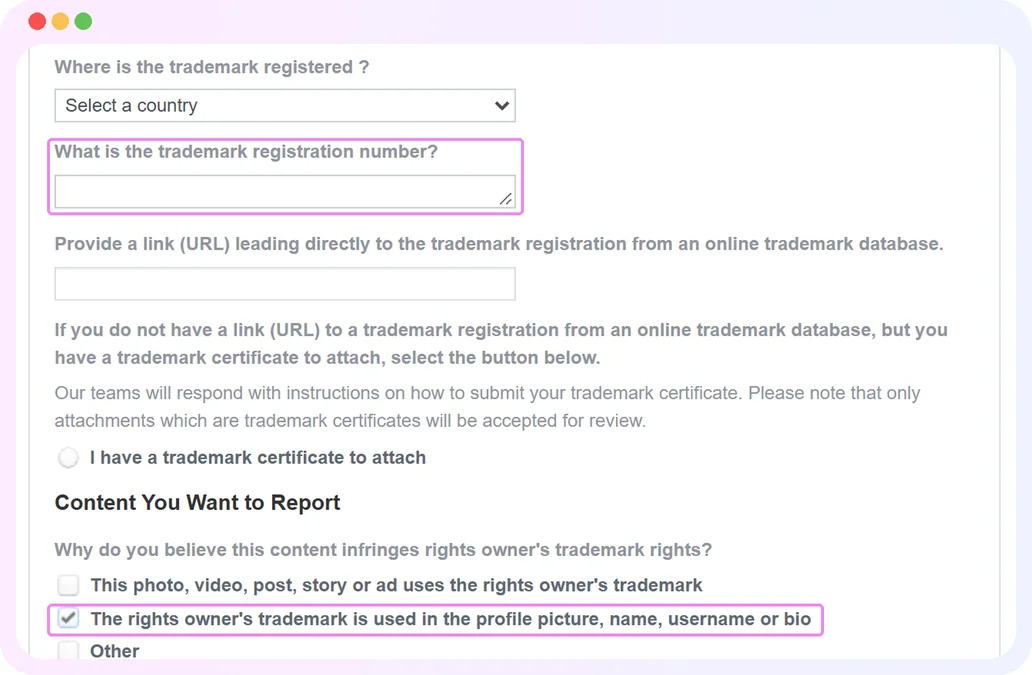
If a Page uses a creator brand or business name that you have registered as a trademark, you can also use Facebook’s Trademark Report Form. Choose that the trademark is used in the profile picture, name, username or bio.
The form asks for the trademark’s registration number and a link to the registration in an online trademark database, or a certificate. Each report covers one registered trademark, with up to 30 links.
The trademark form tells you that Facebook gives the rights owner’s name, your email address and the nature of your report to the person you report. Use a business email if that matters to you.
What happens after you report a fake account
Facebook reviews the profile against its Community Standards and tells you in your Support Inbox whether it broke them.
If Facebook leaves the account up, you can usually click Request another review in the Support Inbox. Facebook says the second review usually happens within 24 hours. If the decision stays the same, some cases can go to the Oversight Board.
If the fake account comes back
Report every new account the same way. Meta’s policy covers accounts that misrepresent who they are to evade enforcement, so a copy of an account that was already removed breaks the rules again.
Keep a list of every link you reported and the date. Repeat fakes are easier to show when you can point to the earlier ones in the additional information.
Tired of reporting the same fake again? On Creator Pro, Bruqi looks for accounts pretending to be you and gets them taken down for you.
Meta also sells Meta Verified, a subscription for creators that lists impersonation protection among its benefits. Plans and features vary by region.
Common mistakes when reporting a fake Facebook account
1) Using the form when you have an account
The impostor form sends account holders back to Facebook. Report from the profile menu.
2) Filing the form for a friend
Only the person being impersonated or their representative can use it. Friends should report from inside Facebook.
3) Sending a copyright report for a fake account
A copyright report is about the photos. Report the impersonation too, so Facebook reviews the account itself.
4) Replying to the scammer
Do not reply. Report the account, then warn your fans on your real accounts.
When to use a service for fake accounts
A service makes sense when fakes keep appearing. New copies can show up on several platforms at once, and each one needs its own report.
Option A: do it yourself. Use the steps above, keep your list of links and check for new copies on a schedule. Our Instagram impersonation guide and the X guide cover the same problem on other platforms, and the other removal guides cover leaks.
Option B: let Bruqi handle it. On the Creator Pro and Top 1% plans, Bruqi takes down impersonator accounts for you. It also finds your leaks, delists them from Google and gets them removed from the sites. See how Bruqi removes copycats and impersonators, or compare plans.
Facebook fake account FAQ
Is it anonymous when you report a Facebook account?
Yes, as a rule. Facebook says it does not include any information about the person who filed a report when it contacts the reported account. The trademark form is the exception.
Can a fake Facebook account be traced?
Not by you through Facebook. Facebook’s help page says to contact a lawyer or the police, who can then request information from Meta.
How many reports until a Facebook account is taken down?
Facebook does not publish a number. It reviews reported accounts against its Community Standards and says a report does not guarantee removal. If you disagree with the decision, you can usually request another review.
What do I do if someone makes a fake Facebook account of me?
Report it from the profile menu, or with the impostor form if you have no account. Then warn your fans on your real accounts and keep the link, in case it comes back.
Not legal advice. This guide describes Facebook’s reporting process as of November 2026.