Report a Fake Instagram Account or Impersonation (2026)
 Bruqi team
If someone is pretending to be you on Instagram, report the fake Instagram account with Instagram’s Report an Impersonation Account form, or in the app as “It’s pretending to be someone else”. The form asks for a photo of your ID.
Instagram then checks the account against its rules and removes fakes that break them. This guide covers the impersonation report form step by step, reporting without an account, catfish accounts that sell fake subscriptions with your photos, and fakes that come back.
Tired of reporting one fake after another? Bruqi is one of the top leak removal services for online creators, with over 51 million leaks removed and a place in Google’s Trusted Copyright Removal Program.
Its Creator Pro plan, at $99 a month, removes impersonator accounts for you on top of daily leak removals. See the takedown service.
How to report a fake Instagram account
You report an impersonation account on Instagram in the app, or with Instagram’s impersonation form, which also works without an Instagram account. Instagram’s help page on reporting an account for impersonation describes both.
Report impersonation in the Instagram app
In the app you can report an account that pretends to be you, someone you follow, a celebrity or public figure, or a business or organization.
- Go to the fake profile. Tap its username on a post or story, or search for it.
- Tap Options, the three dots next to the username.
- Tap Report, then Report Account.
- Tap “It’s pretending to be someone else”.
- Choose who it is pretending to be and follow the steps on screen.
Report a fake Instagram account without an account
No Instagram account of your own? Instagram says you can still report an account that impersonates you with its impersonation form. The next section walks through it.
Instagram impersonation report form, step by step
The Instagram impersonation report form is the “Report an Impersonation Account on Instagram or Threads” page in Instagram’s Help Center. It is a public page, so you do not need to log in to use it.
Step 1. Open the form and choose your situation
Open the form. Under “Which of the following best describes your situation?”, choose “Someone created an account pretending to be me or a friend”. Then answer “Yes, I am the person being impersonated”.
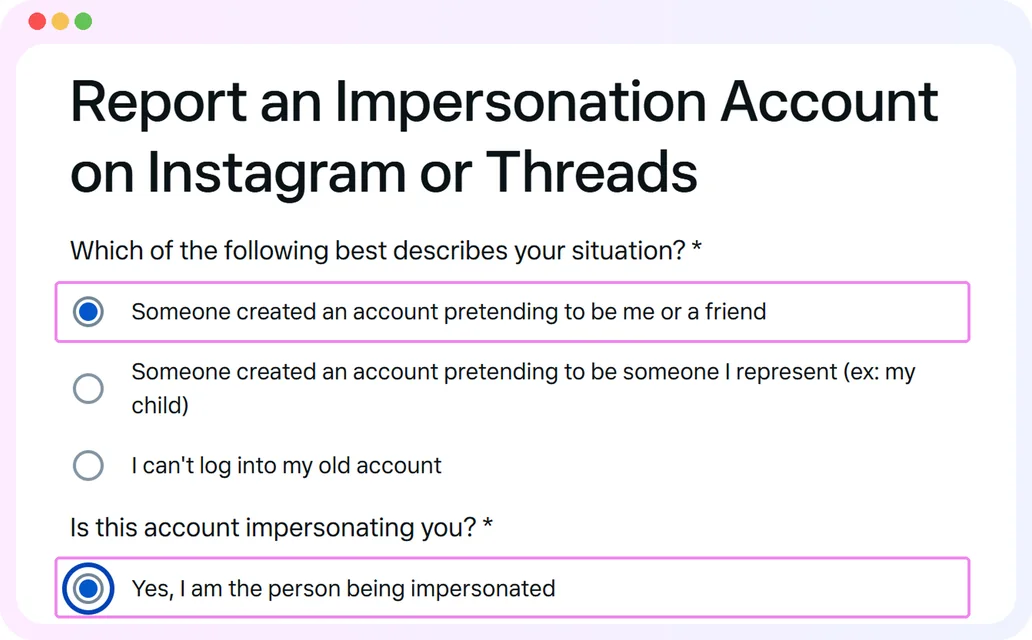
Reporting for your child or someone else you represent? Pick the second option. The form then asks for your relationship to them and their full name.
Step 2. Enter your details and the fake account’s username
Fill in your full name and your email. The only other required field on this screen is the Instagram username of the reported account. The name shown on the fake profile and any Threads usernames are optional.
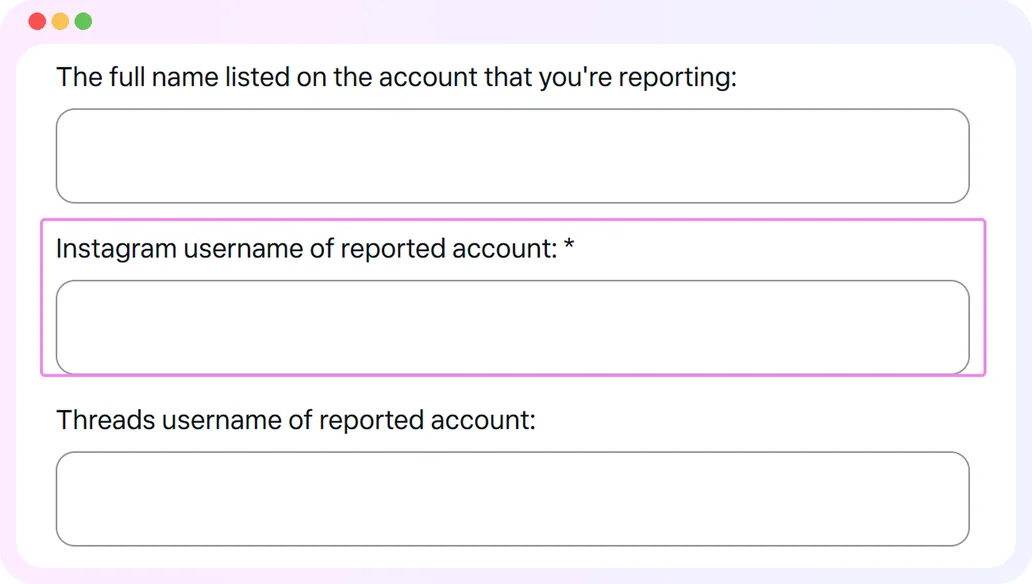
Copy the username from the fake profile character for character, so Instagram finds the right account.
Step 3. Upload your ID photo
Instagram asks you to confirm your identity with a picture of your ID. It says the ID is used only to confirm who you are, is stored securely, is not visible to anyone on Instagram and is deleted within 30 days.
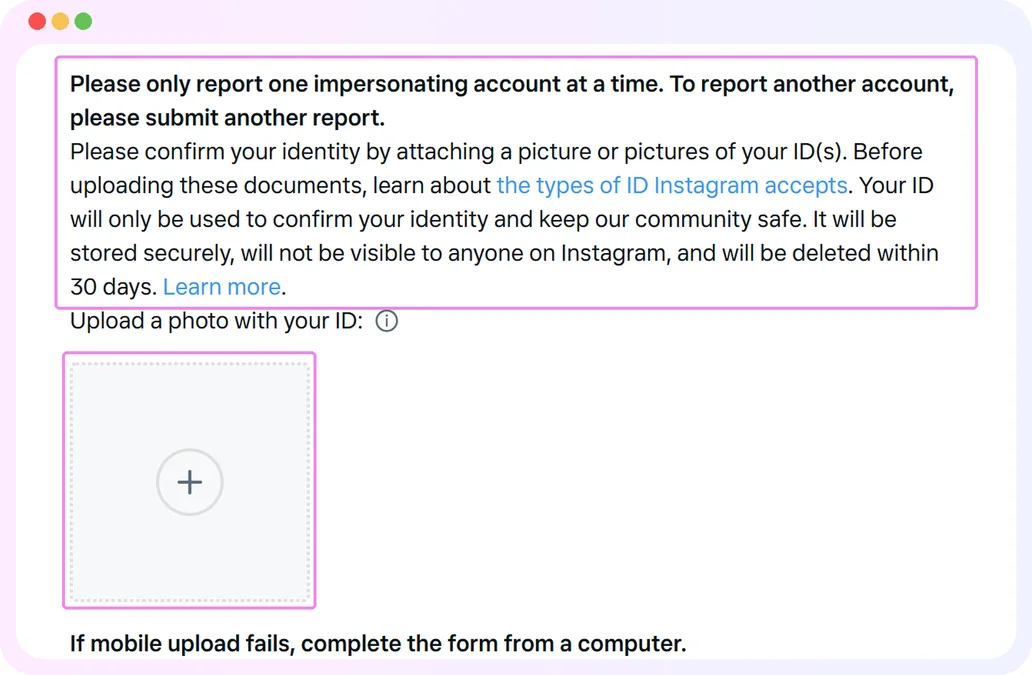
Instagram’s list of ID types it accepts includes a passport, a driver’s license and a national ID card. Use one that shows your full name and photo.
Cover details, do not edit the photo. Hide what Instagram does not need, such as your ID number, before you take the picture. Instagram does not accept ID photos that were edited digitally to hide information.
If the upload fails on your phone, Instagram says to complete the form from a computer.
Step 4. Add the details and submit
The “Additional info” box is required. Say plainly that the account uses your name and photos, give the username of your real account, and say how you found the fake. Then submit.
One report covers one fake account. Instagram asks you to send a new report for each other account.
Who can report impersonation on Instagram
Only you, or someone authorized to represent you, can use the impersonation form. It says Instagram can only act on reports from the person being impersonated or their authorized representative, such as a parent or legal guardian.
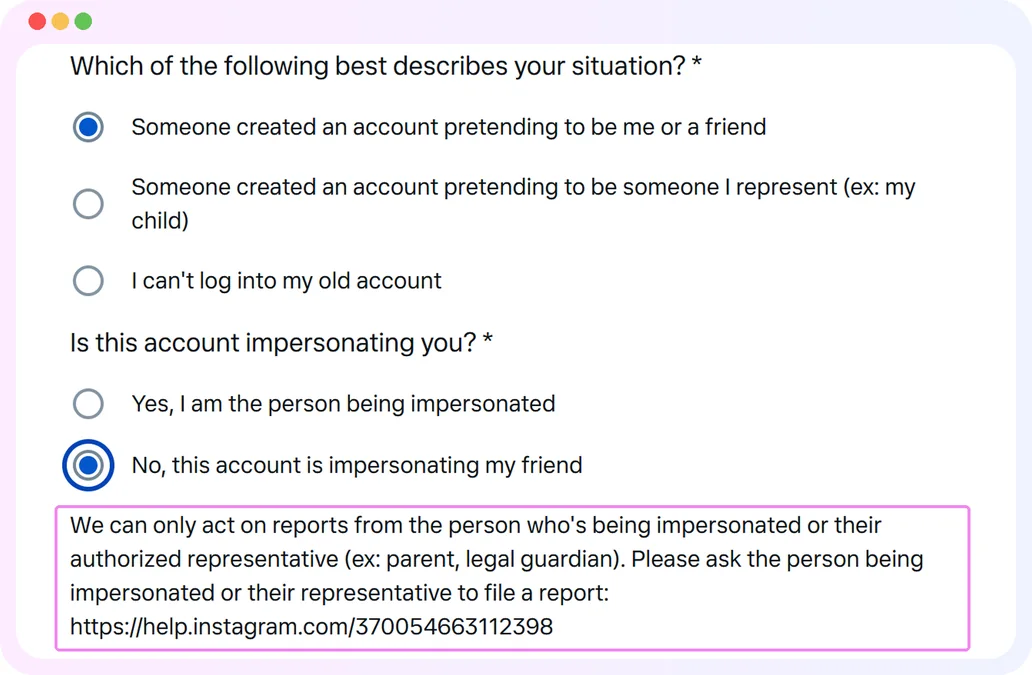
If a fan or friend spots a fake of you, Instagram asks them to let you know so you can report it yourself.
Fake account or copyright problem?
A fake account is an identity problem, so you report it as impersonation. Your photos reposted by another account are a copyright problem with a different form. For that, see how to report copyright infringement on Instagram.
Often it is both: a fake profile full of your photos. Report the profile as impersonation, and use the copyright route for your photos on other accounts.
Fan and parody accounts are allowed under Meta’s identity rules when they make their unofficial status clear, at least in the account name. A fan page that says so is not impersonation.
A fake account of your business or brand
When a fake account copies your brand rather than you as a person, Instagram’s route is a trademark report. Its trademark help says only the trademark owner or an authorized representative may file one.
Instagram regularly passes the rights owner’s name, your email and the report details to the person who posted the content, and suggests a generic business email for that reason. It also notes that not every username containing a trademark is infringement.
Catfish Instagram accounts using your photos
A catfish account takes a creator’s photos, poses as the creator and sends fans to fake subscription links or asks them for money. Meta’s rules ban accounts that use another person’s images, name or likeness to deceive others, and Meta restricts or disables them.
Report each catfish account with the impersonation form, because the photos and the identity are yours. Instagram’s scam advice tells people not to respond to a suspected scam and to report it. It names requests to move a chat off Instagram as a warning sign.
Tell your followers which account is really yours, and where your real links are. Meta Verified for creators, a paid subscription, includes a verified badge and impersonation protection.
When new catfish accounts keep appearing, read how Bruqi removes catfish and impersonator accounts.
How to delete a fake Instagram account
You cannot delete someone else’s Instagram account yourself. You report it with the steps above, and Instagram decides whether to remove it.
What happens after you report a fake account
Instagram reviews the report and, if the account impersonates you, restricts or removes it. Instagram’s help pages give no time frame for this.
For reports made in the app, Instagram shows the decision in your Support Requests under Help. For some reports you can ask for another review there, and Instagram says that second look usually happens within 24 hours.
If the fake account comes back
Report the new account too, with its own report. Meta’s account integrity rules say it may disable accounts made to get around an earlier removal, and accounts owned by the same person as a disabled one.
Keep a list of each fake username and the date you reported it. Mention the earlier account in “Additional info”, so the reviewer sees the pattern.
Fakes that keep coming back are a job for a service. On Creator Pro, Bruqi looks for accounts pretending to be you and gets them taken down for you.
Common mistakes in Instagram impersonation reports
1) Reporting a friend’s fake with the form
Instagram will not act on it. Ask your friend to file the report.
2) Several accounts in one report
The form takes one account per report.
3) An edited ID photo
Instagram does not accept ID photos edited to hide details. Cover them before you take the picture.
4) The wrong form
Use the impersonation form for the fake account and the copyright form for reposted photos.
5) Answering the scammer
Instagram’s advice is not to respond to a suspected scam, and to report it.
When to let a service handle fake Instagram accounts
A service makes sense when fakes appear faster than you can report them. Every new catfish account means another report.
Option A: do it yourself. Report each fake with the form, keep a list of usernames and check for new ones on a schedule. The X guide covers impersonation on X, and the fake Facebook account guide covers Facebook.
Option B: let Bruqi handle it. Creator Pro, at $99 a month, adds impersonator takedowns to daily leak removals, and Top 1% removes leaks hourly. See why creators use a takedown service, compare plans or browse the other removal guides.
Instagram impersonation FAQ
Is it anonymous when you report an Instagram account?
Yes. Instagram says the account you report won’t see who reported it. The exception is an intellectual property report, such as a copyright or trademark report.
How to find out who made a fake Instagram account?
Instagram does not tell you. Its help page says U.S. law does not let private parties get account content, and that it may share basic subscriber information only under a valid subpoena or court order. For that route, talk to a lawyer.
Why isn’t Instagram removing an account pretending to be me?
The report must come from you or your representative, with your ID. An account clearly labeled as a fan or parody account is allowed, so Instagram may leave it up. If your report was declined, ask for another review in Support Requests where that is offered.
What do I do if someone is pretending to be me on Instagram?
If someone made a fake Instagram account of you, report it in the app or with the impersonation form, with a photo of your ID. Then tell your followers which account is yours, and report every copy that appears.
Not legal advice. This guide describes Instagram’s impersonation reporting as of November 2026.