Facebook Copyright Report Form and DMCA Takedown (2026)
 Bruqi team
To report copyright infringement on Facebook, fill in the official Facebook copyright report form, which Meta now calls the Meta Intellectual Property Reporting Form. Choose Copyright, then Facebook, and add the links to the posts.
- Form URL: help.meta.com/requests/
1523801815366035 - Email: ip@fb.com, Meta’s DMCA designated agent
When a report is complete and valid, Meta removes the post and tells the person who shared it. This guide walks through the form, the agent’s address, appeals, Meta Rights Manager and the mistakes that hold a report up.
Rather not hunt down every copy yourself? Bruqi is one of the top leak removal services for online creators, with over 51 million leaks removed and a place in Google’s Trusted Copyright Removal Program.
Its DMCA takedown service finds your leaks, delists them from Google and asks the sites to remove them, from $29 a month.
What is a Facebook copyright report?
A Facebook copyright report, also called a Facebook intellectual property report, tells Meta that something on Facebook uses your work without permission. The same Meta form also takes trademark and counterfeit reports.
Only the copyright owner, or someone authorized to act for the owner, may file one, as Facebook’s page on how to report copyright infringement explains.
For a Facebook DMCA takedown, Meta follows the notice-and-takedown procedure in section 512(c) of the U.S. Digital Millennium Copyright Act, which applies to content that infringes a U.S. copyright. For the whole process, see how a DMCA takedown works.
What counts as a copyright violation on Facebook?
A Facebook copyright violation, or Facebook copyright infringement, is a post that uses someone else’s photo, video, music or writing without permission. Meta’s IP report says you can report a single post, photo, video or ad, or a whole profile, Page, group or event when all of it infringes.
Credit does not make a repost legal. Facebook’s help on unintentional infringement says a copy can still infringe when the poster gave credit, added a disclaimer, earned nothing from it, edited it or found it elsewhere online.
Some uses are allowed. Facebook names criticism, commentary, parody, news reporting, teaching and research as common examples of fair use and other exceptions. Not sure your own work is protected? See how to know if your content is copyrighted.
A fake profile that pretends to be you is not a copyright matter, so it goes through a different report. Our guide on how to report a fake Facebook account covers that route.
Before you file a Facebook copyright report
Have these ready before you open the form:
- The direct link to every copy
Facebook asks for the web addresses that lead straight to each post, photo or video. A link to the uploader’s profile alone does not show Meta what to remove. - A description of your original work
Say what was copied and where you first published it, with a link if it is online. - Your full contact details
Meta asks for your full name, mailing address and phone number, plus an email address. - An email you are happy to share
The uploader gets to see it, so Facebook suggests a business or professional address. - A check that copyright is the right tool
A report covers work you own. See what can and can’t be removed with DMCA takedowns.
How to report copyright infringement on Facebook, step by step
To report copyright infringement, Facebook now sends you to the Meta copyright report form, which opens without a login. These steps follow the form as it looked on November 24, 2026.
Step 1. Open the Facebook copyright form and choose Copyright
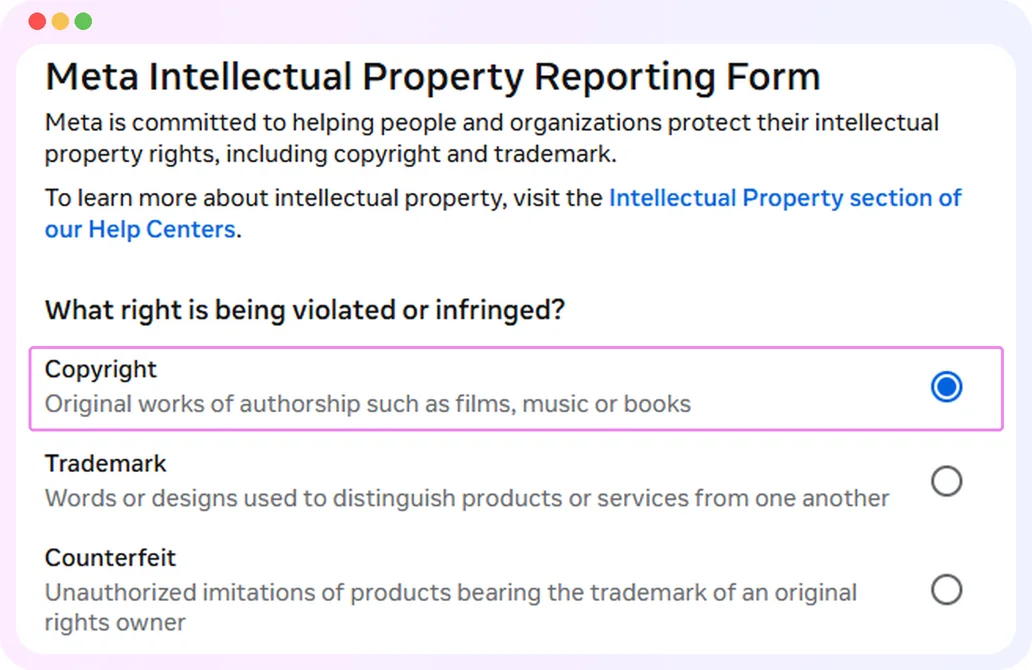
Open the Meta Intellectual Property Reporting Form. Under “What right is being violated or infringed?”, select Copyright and click Next.
Step 2. Select Facebook as the platform
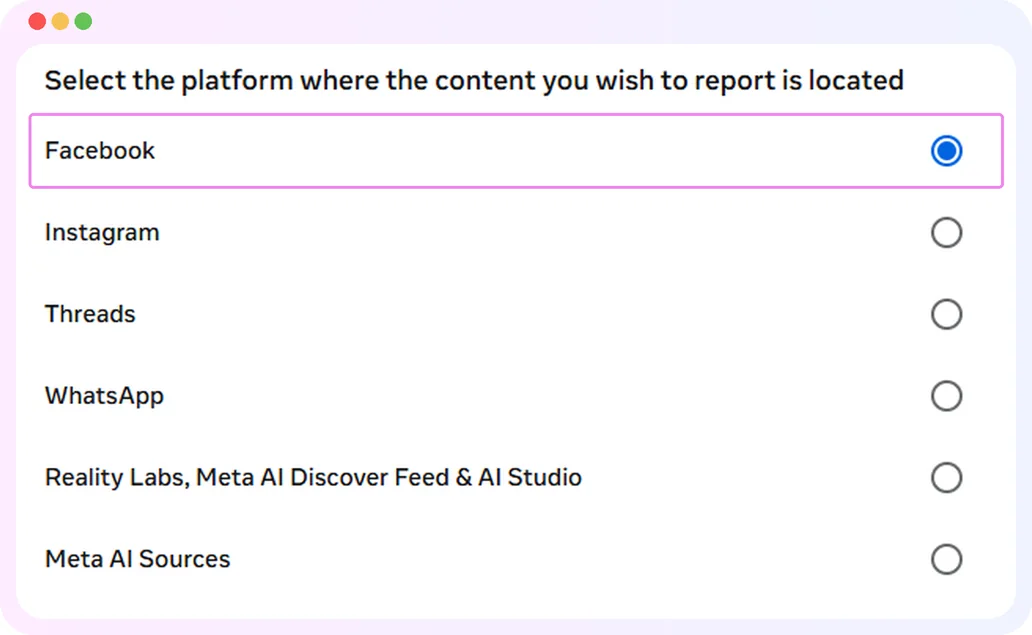
The form serves several Meta apps. Select Facebook as the platform where the content is, and click Next.
Step 3. Tell Meta who owns the copyright
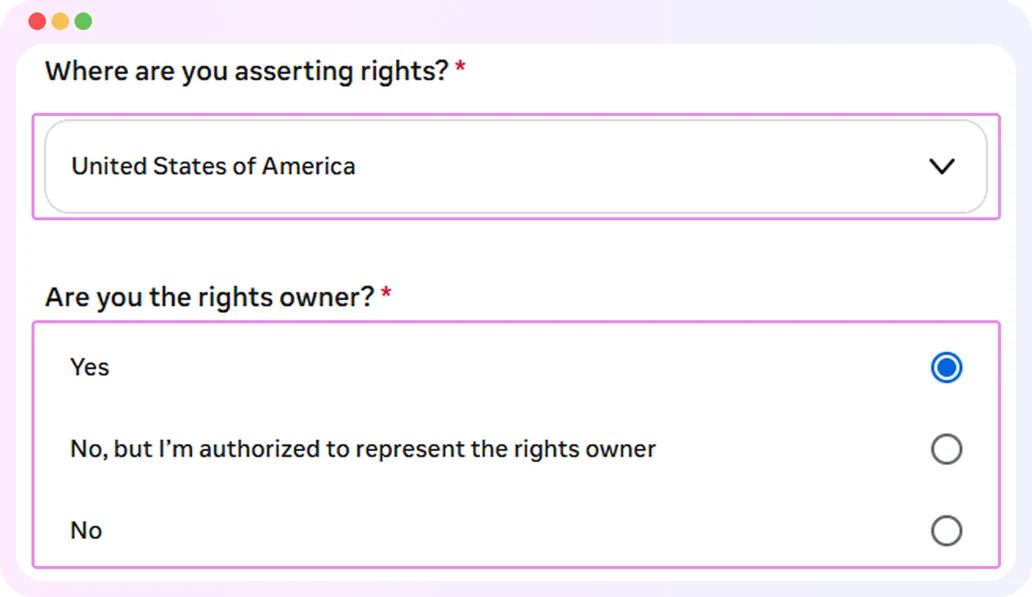
Choose the country where you assert your rights. Then answer “Are you the rights owner?” with Yes, or with “No, but I’m authorized to represent the rights owner” if you file for someone else, and give the owner’s name.
When a representative files, Meta gives the uploader the name of the organization or client that owns the right.
Step 4. Describe your work and paste the links
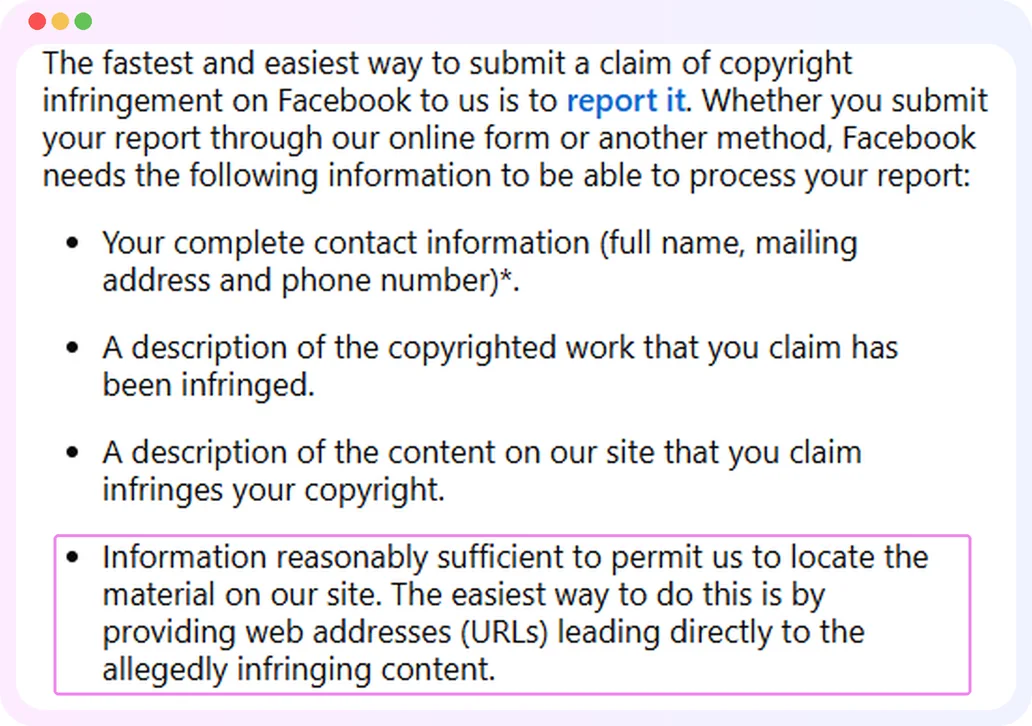
The next screens collect what Facebook’s help on what a copyright report must include lists: your contact details, a description of your work, a description of the copy, and the links that lead directly to it.
For a video, link the video itself, not the Page that posted it.
Meta passes your details on. The uploader receives the rights owner’s name and your email with the report. If you would rather stay out of it, a takedown service like Bruqi files with its own company details. See is this anonymous?
Step 5. Confirm the declaration and sign
Every report ends with a declaration: you believe in good faith that the use is not authorized, the information is accurate, and, under penalty of perjury, you own the copyright or may act for the owner. Then you sign electronically.
How to report a Facebook post for copyright
Use the copyright form, not the menu on the post. Facebook’s help on reporting content describes Options, then Report post, as feedback on how a post goes against the Community Standards.
For stolen work, paste the post’s address into the form above. For a photo, a video, a Page or a group, use that item’s own address.
Facebook DMCA agent email and address
Meta’s DMCA designated agent takes Meta copyright infringement reports for Facebook at ip@fb.com. The postal address is Meta Platforms, Inc., Attn: Meta Designated Agent, 1601 Willow Road, Menlo Park, California 94025, phone 650.543.4800.
Facebook calls these the slower routes on its designated agent page. A Facebook takedown request by email or mail must be a complete copyright claim. The U.S. Copyright Office lists what a valid takedown notice contains.
What happens after you submit a Facebook copyright report?
You get an automated message with a unique report number. Save it, because you need it to contact Meta about the report. If Meta needs more information, reply to its message directly.
Meta’s IP operations team reviews every report. When it is complete and valid, the team removes the content, typically within a day or less, and confirms to you.
The uploader then receives the report number, the rights owner’s name, your email, the details of the report and how to appeal, as Facebook’s page on what happens after a copyright report states.
Under Facebook’s repeat infringer policy, people who keep posting infringing content can have their account disabled, their Page or group removed, or their posting limited.
Reported by mistake, or reached an agreement with the uploader? Use the retraction form in the email you got when you filed. Meta then restores the content where it can.
Facebook copyright appeal form and counter-notice
If a Facebook copyright claim got your post removed, the message you received explains how to respond. If Meta says the post was removed under the DMCA procedure, you can file a DMCA counter-notification. For any other copyright report, you file an appeal.
The Facebook Copyright Appeal Form asks for the report number from your removal email. Facebook says to open it through the link in the message it sent you, or it cannot process the appeal.
Meta forwards a valid counter-notification to the person who reported, with your contact details. Unless they tell Meta they have gone to court, it restores eligible content, which can take up to 14 business days.
Got a counter-notice on a post you reported? Call a lawyer. Keeping the post down from here takes a court action.
Is there a Facebook copyright strike?
Facebook’s help does not use the word strike or give a number. Posts restored after a valid counter-notice do not count against the uploader, and restorations after an appeal are taken into account.
Meta Rights Manager and content protection
Meta Rights Manager is Meta’s video, audio and image-matching tool. Rights holders of all sizes, from individual creators to media publishers, use it to find and manage their work on Facebook and Instagram, including Live videos.
To get Facebook Rights Manager, you request access from a Facebook Page. Meta checks the eligibility criteria: mostly original posts, exclusive rights, a catalog of work, past takedowns and account standing. After a rejection you wait 7, 21 or 60 days.
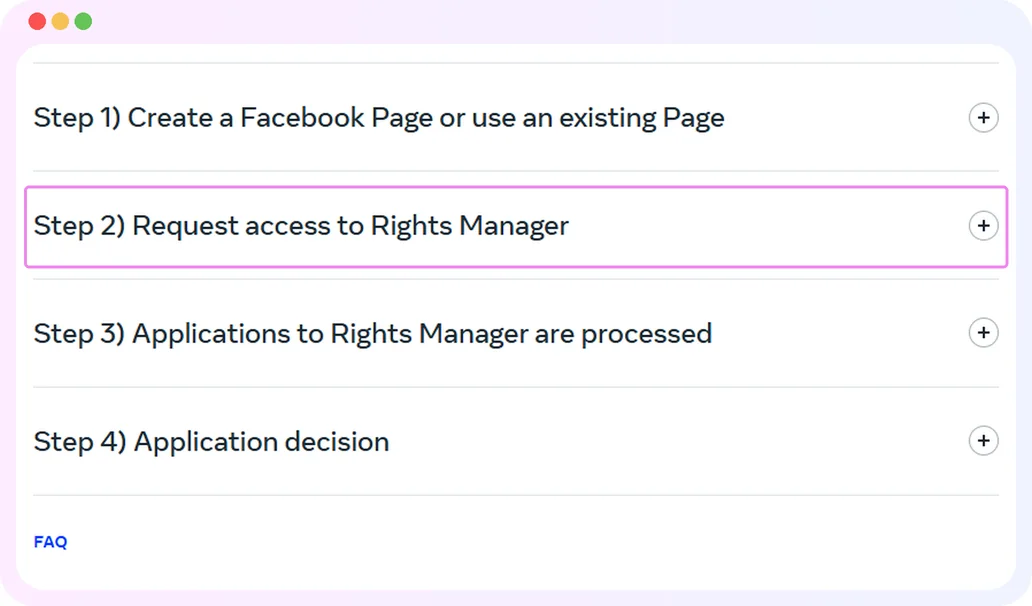
For creators, Rights Manager in Meta Business Suite is giving way to content protection in Creator Dashboard. It protects the reels you post to Facebook and alerts you to full or partial copies on Facebook and Instagram. You can add a credit link, hide the copy or release it.
Content protection is automatic for creators in Facebook Content Monetization who meet Meta’s integrity and originality standards, and others can apply. It only scans Facebook and Instagram, so copies on other sites still need a takedown notice.
Common mistakes that slow down a Facebook copyright report
- Linking a profile instead of the post. Meta needs the address of each copy. Report a whole Page or group only when everything on it infringes.
- Using the Report post menu for stolen work. That route is for Community Standards problems. Copyright goes through the IP form.
- Filing with a personal email. The uploader gets the address you give. Use a business address, or let a service like Bruqi file for you.
- Losing the report number. You need it for any follow-up with Meta, including a retraction.
When to use a DMCA takedown service for Facebook
A service makes sense once copies appear faster than you can report them. Each report to Meta covers Facebook only, so the same photos and videos on other sites and in Google search need their own notices.
Option A: do it yourself, with a system. Keep one notice template and a list of links, and check on a schedule. Our removal guides cover Instagram, Reddit, X and Bing. If the site is not there, the free hosting checker shows who hosts it.
Option B: let Bruqi handle it. Bruqi finds your leaks, delists them from Google and contacts the sites to get them removed. Paid plans start at $29 a month, and the DIY plan is free. Removals on Facebook itself start from Creator Pro, at $99 a month, with daily removals and impersonator takedowns.
Compare the plans or read why creators use a takedown service.
Facebook copyright FAQ
Does Facebook take reports seriously?
Yes. Meta has a global IP operations team that reviews copyright reports around the clock, in many languages. It says review by people helps catch reports that are wrong or made in bad faith.
Does reporting a Facebook post get it taken down?
Yes, when the copyright report comes from the owner, includes the direct link and is valid. If something is missing, Meta asks you for more information first.
What is a Facebook copyright notice?
It is the message Facebook sends when your post is removed after a copyright report. It may name the rights owner and give their email and the report details, and it explains how to appeal or counter. If the claim is wrong, contact the owner or use those instructions.
How to check copyright posts on Facebook?
Before you post, Facebook suggests asking whether you made it, whether you have permission and whether an exception applies. To find copies of your own reels, content protection lists each match with its views.
What are the three things not protected by copyright?
Meta names facts, ideas, and names, titles and slogans. A trademark may protect a name or slogan instead. Copyright on Facebook can still protect the original words and images you use to express an idea.
How do I contact Facebook to complain?
Start in the Facebook Help Center or its contact form. To report intellectual property on Facebook, use the copyright form or email ip@fb.com.
Not legal advice. This guide describes Facebook’s copyright reporting process as of November 2026.