Bing DMCA (2026): How to File a Bing Copyright Takedown
If you’ve found your work showing up in Bing results (or Bing Images / Videos) without permission, a Bing DMCA notice is one of the fastest ways to get those specific URLs delisted from Bing’s search index.
Something to keep in mind is that Bing can remove search results, but it usually can’t magically delete the content from the website hosting it.
If you want the “remove it everywhere” version, you typically do both: (1) delist on Bing, and (2) send a DMCA notice to the site/host where the file lives. (If you’re new to that whole process, Bruqi has a solid plain-English overview on how DMCA takedowns work and a broader DIY removals guide.)
What Bing DMCA actually means (and what it doesn’t)
A Bing DMCA takedown is a copyright infringement report submitted to Microsoft that asks Bing to remove (delist) specific infringing URLs from search results, including Bing’s image and video indexes.
What it does:
- Delists specific pages (and sometimes specific image/video source URLs) from Bing results, reducing discovery through Bing.
What it doesn’t do:
- Delete the content from the original website (it can still be accessible if someone visits the URL directly). Microsoft Support explicitly notes that search engines don’t control what websites publish, and removal from search results doesn’t remove the content at the source.
If you’re trying to understand the difference in a practical way, this is the same idea as delisting vs removing at the source.
Before you file: make sure DMCA is the right tool
DMCA is for copyright issues: photos you took, videos you filmed, writing you wrote, graphics you designed, etc.
A few common “gotchas”:
- If you’re in a photo/video but didn’t create it, you might not be the copyright owner (often the photographer/videographer is). Bing’s form even calls this out for photos.
- If the problem is non-consensual intimate imagery, Microsoft points to a different reporting route (separate from copyright).
- If it’s defamation, privacy, personal data, etc., that’s usually not DMCA, different policies apply.
Also: you generally do not need to register your work with the U.S. Copyright Office to send a takedown notice, although registration can matter if you ever end up in court.
Where to submit a Bing DMCA removal (official form)
For a standard dmca removal bing request (i.e., delisting from Bing’s index), Microsoft/Bing uses the “Report Copyright Infringement” form here:
Microsoft also maintains a central page explaining reporting options and its DMCA agent contact info:
- Microsoft Legal: Reporting Infringement
How to send a DMCA to Bing (step-by-step)
Here’s the clean, accurate process that matches Bing’s current form fields (as of January 2026).
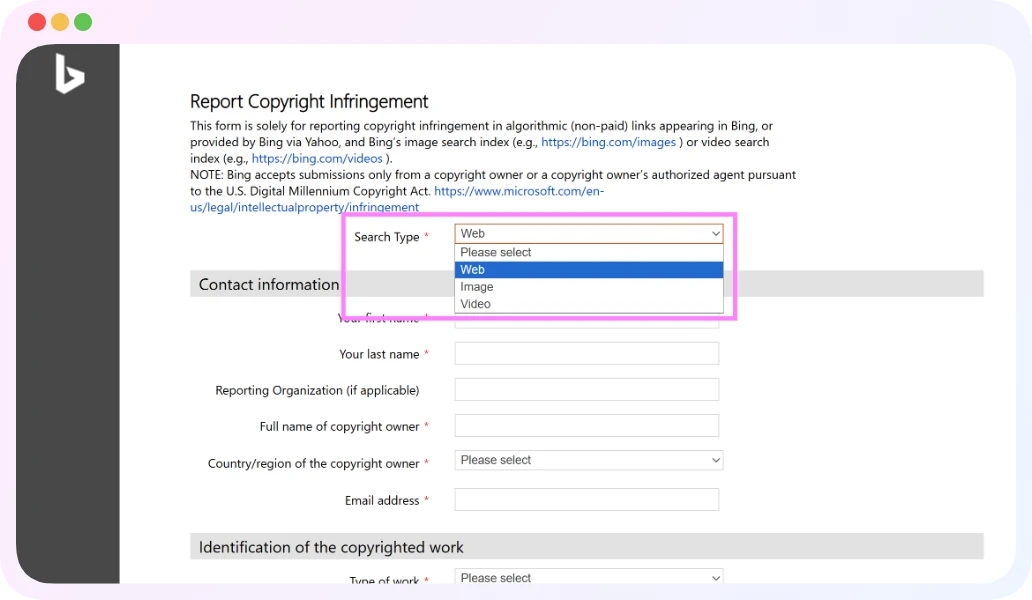
1) Go to the form and select the Search Type
Go to the Bing DMCA notice form.
Select Web, Image, or Video. Pick the one that matches where you’re seeing the infringement.
2) Fill in your contact info (and expect it to be shared)
You’ll provide your name, email, and country/region, plus the full name of the copyright owner (likely you).
Important: Know that the information you enter may be shared with third parties or the public, including the alleged infringer.
So if privacy is a concern, think carefully about what email/address you use (or consider using an professional service like Bruqi to protect your privacy).
3) Identify the copyrighted work
Bing asks for:
- Type of work (photo, video, text, software, etc.)
- title (optional)
- Authorized example URL - where your original content appears (Even if it's behind a paywall).
- Description, and you can also upload an attachment up to 10MB in specific formats.
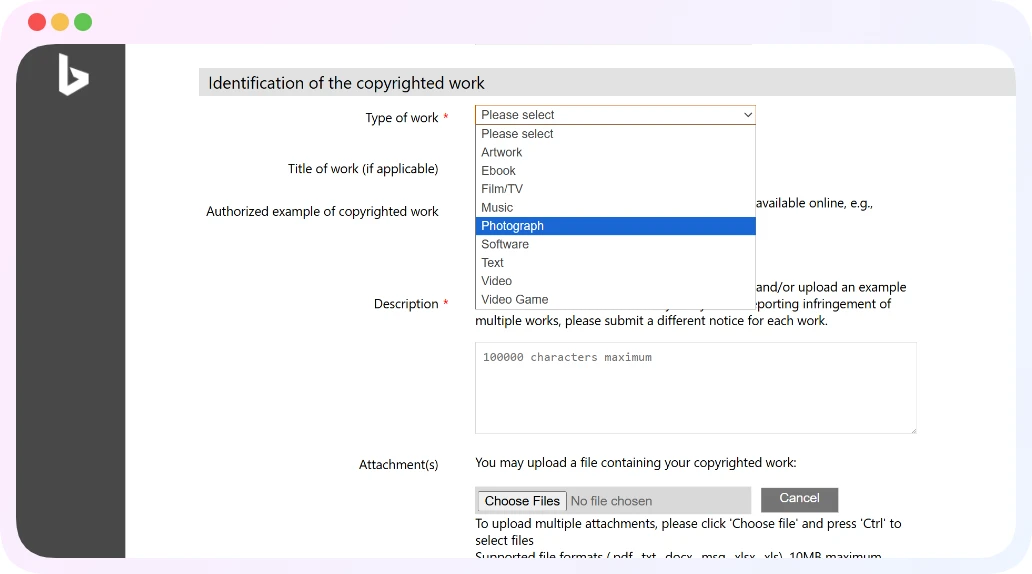
Tip: The clearer your “authorized example,” the less guesswork Bing has to do.
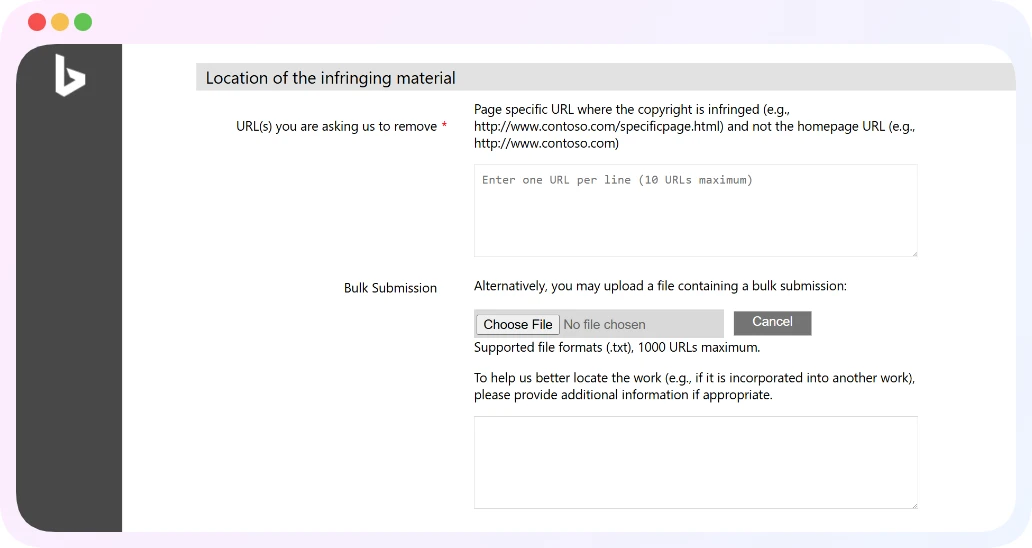
4) Provide the infringing URLs
For Web results
You generally list the page URLs you want removed (not just a domain homepage).
For Bing Images (very important)
Images effectively have two URLs:
1) Source Page URL (the webpage that contains/embeds the image), and
2) Source Image URL (the direct file URL, often ending in .jpg/.png).
Bing also warns they can’t act on bing.com image result URLs (or “tse” URLs). You need the original source page and the original image file location.
If you’re dealing with a lot of URLs, Bing allows a bulk .txt upload (tab-separated, up to 1000 lines) for image removals.
5) Complete the required legal statements + electronic signature
Bing’s form requires you to confirm the standard DMCA-style statements:
- good faith belief the use isn’t authorized,
- accuracy + authority under penalty of perjury,
- and an acknowledgement about potential liability for misrepresentation (17 U.S.C. 512(f)).
You’ll then “sign” electronically by typing your name and completing the CAPTCHA.
What happens after a Bing DMCA takedown?
A few realistic expectations:
1) Delisting isn’t instant. Bing needs time to process, verify, and then reflect changes in the index.
2) The page can still exist online. Again, Bing is a search engine index. The source site is where deletion happens. Microsoft Support is pretty blunt about this: the most direct way to remove content is to contact the webmaster and get it removed at the source.
3) Publishers can dispute. Microsoft notes publishers can contact Bing if they believe something was removed incorrectly.
4) Recurring re-uploads are normal. This is especially common with stolen media (including creator content, paywalled content, and piracy sites). If you’re repeatedly doing takedowns, that’s where tooling/services can help, mainly by finding new links fast and keeping the paperwork consistent. (This is basically the problem Bruqi’s removals workflows are built around, but you can absolutely DIY it if volume is low.)
Common mistakes that get Bing DMCA requests ignored or delayed
The patterns that waste the most time:
- Submitting bing.com search result URLs instead of the source URLs (especially for images).
- Not providing enough detail to identify the original work (no description, no authorized example).
- Filing when you’re not the copyright owner (or not authorized to act). Bing only accepts submissions from the owner or an authorized agent.
- Using DMCA for something that isn’t copyright (privacy/harassment/etc.).
FAQ on Bing DMCA
What is Bing DMCA?
Bing DMCA is the process of submitting a DMCA-compliant copyright complaint to Microsoft/Bing so Bing can delist infringing URLs from its web, image, or video search results.
How do I send a DMCA to Bing?
Use Bing’s “Report Copyright Infringement” form and provide: your contact info, identification of your copyrighted work, the infringing URL(s), and the required good-faith/perjury statements with an electronic signature.
How do I report copyright to Bing?
Submit a Bing DMCA takedown through the official form intended for algorithmic search results (not ads). Microsoft also lists an option to contact its DMCA agent by email/mail, but the online form is the fastest and easiest method.
How to get something removed from Bing?
If it’s copyright infringement, file a DMCA-based removal request to delist the URLs. If you need it gone from the internet, you’ll also want to contact the website/host to remove it at the source, Bing notes removal from search doesn’t remove the content itself.
Not legal advice, just an informational guide to the Bing DMCA takedown process as it exists in January 2026.


